 TimChungCu


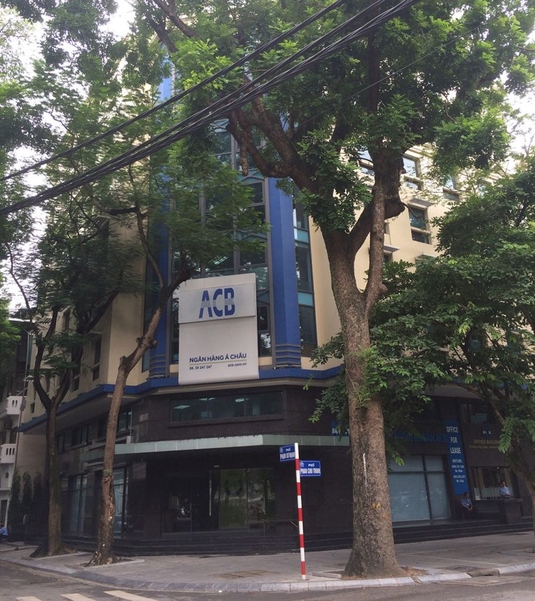
ACB Office Building
10 10 Phạm Sư Mạnh, Phường Phan Chu Trinh, Hoàn Kiếm, Hà Nội
Xem thêm dự án tại Quận Hoàn Kiếm, Hà Nội →
Giới thiệu
1.Vị trí: ACB Office Building có vị trí địa lý và giao thông kết nối vô cùng thuận lợi. Tọa lạc tại số 10 Phan Chu Trinh, một trong những tuyến phố chính nối liền giữa quận Hai Bà Trưng và Hoàn Kiếm, khu vực nhiều tòa nhà văn phòng lớn của các công ty trong và ngoài nước đang hoạt động và phát triển, ACB Office Building sẽ là một trong những tòa nhà văn phòng có tiện ích nội khu và liên kết vùng tốt nhất. 2.Tiện ích: Hệ thống điện chiếu sáng theo hệ thống bóng đôi rất tốt đảm bảo đầy đủ ánh sáng cho toàn văn phòng. Tường vách cách âm tốt đảm bảo sự tĩnh lặng, riêng biệt của từng công ty khác nhau trong tòa nhà. Độ cao của trần nhà đạt kích thước chuẩn là 2.8m, đảm bảo sự thông thoáng cho không gian của từng công ty. Sàn văn phòng là loại gạch men cao cấp nhất, màu sắc hài hòa tạo sự tương phản ánh sáng tốt nhất cho từng văn phòng. Thang máy sạch đẹp, rộng rãi và hiện đại đảm bào an toàn và vận chuyển nhanh nhất có thể. Cáp quang đường truyền Internet rất tốt, hệ thống camera rõ nét, hệ thống phòng cháy chữa cháy ổn định và chuyên nghiệp, máy phát điện công suất lớn đảm bảo đầy đủ diện năng cần thiết cho toàn bộ tòa nhà khi mất điện. 3.Chủ đầu tư: Ngân hàng Thương mại CP Á Châu Dự án khác: KDC Little Sài Gòn Purchase The Pro HTML Editor License! pro Online HTML Editor The best real-time online HTML editor software kit with dynamic instant live visual preview and inline WYSIWYG editor using CKEditor and markup clean-up feature. Includes a HTML viewer, editor, compressor, beautifier and easy formatter. It's impossible to create invalid code with this great tool. The operation of this HTML editor with built-in HTML Cleaner is very intuitive and it's working in your browser without installing any additional program. Compose your text using the WYSIWYG editor on the left and adjust formatting of the source code on the right. To convert Microsoft Word, PDF or any other rich-text documents to HTML, simply paste it in the visual editor. Perform bulk operations on the HTML code by clicking the Clean button after adjusting the settings. online html editorBefore you start composing the content for a live website I advise you to experiment with the features populating the work area with a demo text clicking the Quick Tour menu item. The visual editor works like a regular text composer program, just use the commands above the text area to adjust the content and in the meantime you'll notice the source editor changing with it. If you're familiar with HTML code composing then you can adjust the code on the right. The control panel above the HTML source editor lists the most important commands: – Revert the text back to the state before the cleaning or execution of any other major event. The visual editor has its own Undo button. – The fresh page command starts a new document. The same feature is listed below File / New document. – Deleting the new lines from the HTML code you can compress the source code. – Define replacement rules and execute them. Use the plus button to define new rules and the recycle bin to remove one. – Fill the page with meaningless writing to fill gaps or experiment with the layout. – Pick a colour from the palette and use them with the easy Click and Copy feature. Save the active colors for later use or use the advanced color mixer by RGBColorCode.com – Adjust the font size according to your preferences. – Set up the cleaning options here. Your settings will not be lost when you leave the website. Click the header to select/disable all options. Clean – Execute the selected options. Never forget: Have a backup before using this tool to make sure you can always revert back to your original document. Always check your code before publishing on a live website. This editor never saves or sends out your document, all operations are performed on your local computer. Like most websites, this one uses cookies. Div table styling Make sure you apply the CSS code below when you publish tables converted to div elements. .rTable { display: table; width: 100%;} .rTableRow { display: table-row; } .rTableHeading { background-color: #ddd; display: table-header-group; } .rTableCell, .rTableHead { display: table-cell; padding: 3px 10px; border: 1px solid #999999; } .rTableHeading { display: table-header-group; background-color: #ddd; font-weight: bold; } .rTableFoot { display: table-footer-group; font-weight: bold; background-color: #ddd; } .rTableBody { display: table-row-group; }
Tiện ích
- Hệ thống PCCC
- Thang máy
- Camera an ninh
- An ninh 24/7
- Chỗ đậu xe